I recently had to create a Discord bot to interact with a TeamCity server, however it proved a little difficult to find information on exactly how you might go about this. Also, while this guide is for interacting with TeamCity, you could change it to do whatever you need.
Project Structure
/
├── bot/
│ ├── app.js
│ └── bootstrap-theme.min.css
└── auth.json
Installing Dependencies
We need to install the TeamCity API library, or at least it makes life easier, and the latest version of the discord.io bot, otherwise it won’t connect to Discord.
npm i woor/discord.io#gateway_v6 teamcity-rest-api --save
Create a Discord Bot and Retrieve a Token
Follow this guide to actually create the Discord Bot, then save the credentials in auth.json in the following format:
Writing the Actual Bot
The bot is fairly straight forward, so I won’t go through the code in great detail, though will touch on using embeds later.
Using Embeds
Sending a message is great, however, if you’ve used other integrations or bots for Discord or Slack, then you’re probably used to a richer experience. To achieve this, we can post an embed to a channel, which itself contains an array of fields.
Posting an embed is simple, though there are two caveats to be aware of;
- You can use Discord markdown in the field values, but need to make sure you escape characters where required, such as backticks, and
- When sending an embed with a Discord.io bot, you need to set the message to an empty string
tc.builds.get({ id: buildId }).then(res => {
  bot.sendMessage({
    to: channelID,
    message: '',
    embed: {
      color: 6826080,
      title: `Build Status ${res.status}`,
      fields: [
        {
          name: 'Build Status',
          value: `${res.status}`,
          inline: true
        },
        {
          name: 'Build State',
          value: `${res.state}`,
          inline: true
        },
        {
          name: 'Status Text',
          value: `\`\`\`${build.statusText}\`\`\``,
          inline: false
        }
      ]
    }
  });
});
With that, you’ll get an output of roughly something like this:
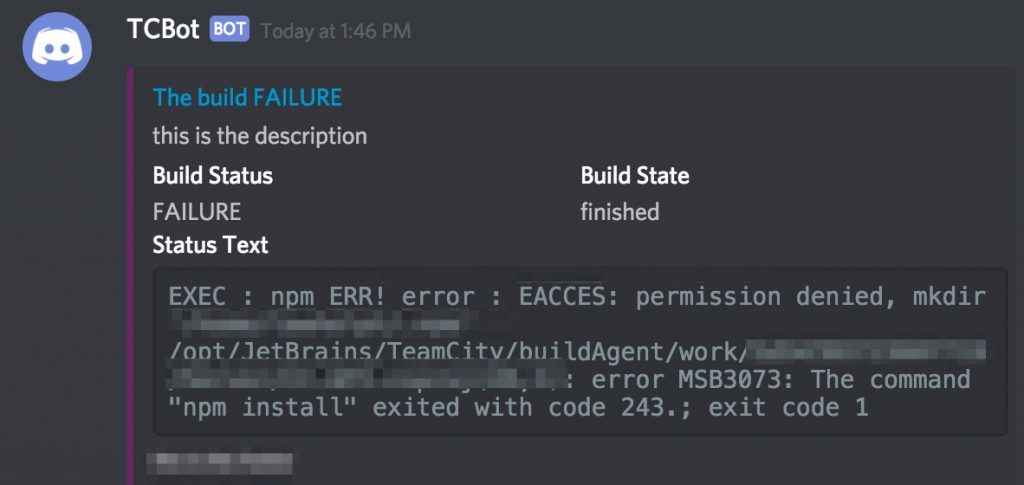
Naturally, it’s possible to create something better than this, but the provided example is only a very quick example of how it can be done.